One has racing bolsters, a headrest pillow and a lumbar cushion on a strap. The other has a mesh back, a seat you can slide forward and armrests that move four ways. The gaming chair vs office chair question gets argued as if it’s about looks. It isn’t. It’s about which adjustments exist and whether your body can change position over eight hours. Below is the honest comparison, the two features that decide long-session comfort, plus a third category most buyers never consider. The cross-legged and ergonomic office chairs further down are that third category. They solve a problem neither of the usual two addresses.
Quick Answer at a Glance
Office chairs win on adjustability and on sitting upright for long stretches. Gaming chairs win on recline depth, headrest, and looking the part. If you work eight hours a day at a desk, buy the office chair. If you game in a reclined position for long sessions and value the headrest, the gaming chair earns its place. If you sit cross-legged, neither one fits you.
| Feature | Gaming chair | Office chair |
|---|---|---|
| Seat shape | Bucket with raised side bolsters | Flat or waterfall front edge |
| Seat depth adjustment | Rare | Common on mid range and up |
| Lumbar support | Strap-on pillow | Built into the backrest curve |
| Armrests | Padded, often 2D or 3D | Often 4D, wider range |
| Recline | Deep, often to 180 degrees | Usually 120 to 135 degrees |
| Tilt mechanism | Centre tilt, whole chair pivots | Synchro tilt, back and seat move separately |
| Headrest | Included, often a strapped pillow | Optional, usually adjustable |
| Best for | Reclined gaming, media rooms, teens | Upright desk work, long typing days |
The Bucket Seat Problem
Racing seats exist to hold a driver in place through corners. Nobody corners at a desk. Those raised side bolsters do two things in a home. They stop you shifting your weight side to side, which is exactly what a body wants to do after two hours. And on anyone broader than the seat was designed for, they press into the outer thigh and hip all day.
A flat seat pan lets you move. That freedom sounds minor and it’s the single biggest comfort difference over an eight hour day. The gaming chair’s answer is recline. Push the back to 150 degrees and the bolsters matter less because your weight has shifted rearward. That works for gaming. It doesn’t work for typing.
Lumbar Support: Pillow Against Curve
Adjustments That Actually Matter
Ignore the feature list and check three things.
- Seat depth first. There should be two to three fingers of gap between the seat edge and the back of your knee. Too deep and the seat cuts circulation. Too shallow and your thighs get no support. Most gaming chairs offer no seat depth adjustment at all, which is the real design gap in that category.
- Tilt mechanism second. Centre tilt pivots the whole chair. Reclining lifts your feet off the floor. Synchro tilt moves the backrest further than the seat. You can lean back with your feet still planted. For desk work, synchro is worth paying for.
- Armrests third. Four-way armrests move up, forward, sideways and rotate. Set them so your forearms rest level with the desk and your shoulders drop. Fixed or height-only armrests usually end up in the way. People remove them.
The Third Option: Chairs Built for How You Actually Sit
An honest note before the picks. Urbano Mart doesn’t stock racing-style gaming chairs or executive mesh task chairs. What it does stock is the category neither of those covers: seating built for cross-legged and multi-position sitting.
- Cross Legged Fabric Office Chair – Adjustable Swivel Chair for Home Office, Vanity, or Living Room to Pinterest (opens in a new window)Sale!

Cross Legged Fabric Office Chair – Adjustable Swivel Chair for Home Office, Vanity, or Living Room
Original price was: $185.00.$90.00Current price is: $90.00.Select options This product has multiple variants. The options may be chosen on the product page - Ergonomic Criss Cross Legged Office Chair with Retractable Footrest to Pinterest (opens in a new window)Sale!
Ergonomic Criss Cross Legged Office Chair with Retractable Footrest
Original price was: $380.00.$155.00Current price is: $155.00.Add to cart - Ergonomic Cross Legged Chair, 360° Swivel Heart Shaped Chair with Wheels to Pinterest (opens in a new window)Sale!
Ergonomic Cross Legged Chair, 360° Swivel Heart Shaped Chair with Wheels
Original price was: $395.00.$155.00Current price is: $155.00.Add to cart -
Sale!
Modern Accent Chair with Ottoman
Original price was: $295.00.$195.00Current price is: $195.00.Add to cart
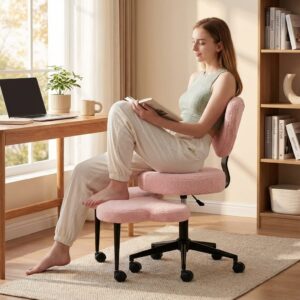

Ergonomic Cross Legged Chair, 360 Degree Swivel Heart Shaped Chair with Wheels
15 deep by 20 wide by 38.6 high on a stainless steel frame with memory foam, rated to 385 pounds, with five casters and a wide padded footstool that also swivels. The crescent backrest sits low enough to support the lower back while leaving the shoulders free. Seat height adjusts across a 4.7 inch range. The narrow 20-inch width suits smaller frames rather than broad shoulders.
Ergonomic Criss Cross Legged Office Chair with Retractable Footrest
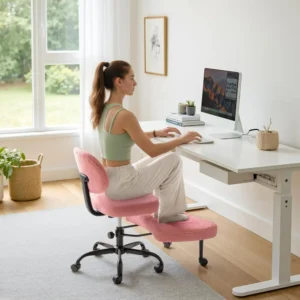
35.43 deep by 26.4 wide by 36 high, 26.5 pounds, rated to 300 pounds. The footrest rotates a full circle and extends 7.87 inches, which is what makes cross-legged, kneeling and squatting positions all workable in one chair. The backrest is fixed rather than adjustable. Anyone who wants a reclining back should skip this one.
Cross Legged Fabric Office Chair, Adjustable Swivel Chair for Home Office
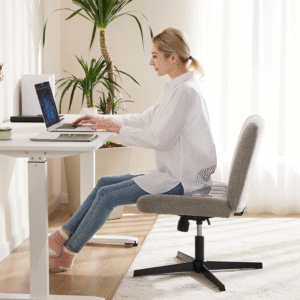
25.2 wide by 18.7 deep with a seat height from 15.94 to 19.69 inches, rated to 300 pounds, armless with a rocking function. Armless is the point. It’s what lets you fold a leg up without an armrest in the way. It tucks fully under a desk. The trade is no forearm support. It suits shorter sessions than a full task chair.
Modern Accent Chair with Ottoman
A five-stage backrest running from 90 to 180 degrees with a matching ottoman, rated to 350 pounds, on non-slip rubber pads. Flat at 180 it’s a daybed. Upright at 90 it’s a reading chair. This is the closest thing here to the deep-recline argument for gaming chairs, without the racing bolsters. It has no casters and no height adjustment. It isn’t a desk chair.
The Posture You Actually Sit In
Here’s what both sides of the usual argument miss. The healthiest posture is the next one.
Spending eight hours in a perfect upright position still loads the same discs, the same hip flexors and the same shoulders for eight hours. Physiotherapists talk about postural variety for that reason. Shifting between upright, reclined, cross-legged and standing does more for a back than any single chair setting.
This is why so many people end up sitting cross-legged on a task chair that wasn’t built for it, perched on one hip with a foot tucked under. The chair fights them, the seat edge digs in. They blame their back.
A chair with a wide seat, a low or absent armrest and a footstool lets that position happen properly. It’s not a replacement for a good task chair on a heavy typing day. It’s the second chair. The one for hours when you’re reading rather than typing.
Office Chair No Wheels: When Casters Are Wrong
Casters exist so you can move between parts of a desk. If your desk is one screen and a keyboard, they mostly let the chair drift while you type.
Three situations where an office chair no wheels is the better answer. On thick carpet, where casters snag and the chair sits at an angle. On a hard floor without a mat, where wheels leave marks and the chair rolls every time you lean. And in a shared room, where a rolling chair spends its life somewhere other than where you left it.
A fixed-base chair also lets a manufacturer drop the seat height, which suits shorter users far better than a gas lift with a 17 inch minimum. For a casual corner rather than a work desk, something like the Faux Fur Saucer Chair folds away entirely, which no gas-lift chair does.
Desk Chair for Home Office: What Changes at Home
An office buys chairs by contract, with a warranty and a facilities budget. At home the calculation is different in three ways. The chair is visible. It sits in a room people live in. A black racing seat with red stitching has a cost that isn’t on the price tag.
The hours are uneven. Home working days mix three hours of calls, two of typing and an hour on the sofa with a laptop. That pattern suits a chair with range more than a chair with one perfect setting. The floor is different. Homes have carpet, rugs and wooden floors that office buildings don’t. Check the caster type against your floor before ordering. Failing that, choose a fixed base.
Which One Should You Buy
Two Desks, Two Answers
One reader worked seven hours a day at a laptop and had bought a racing-style chair for the look. The fixed seat depth left three inches of unsupported thigh and the bolsters stopped them shifting. A flat, depth-adjustable seat fixed a problem they’d assumed was their posture.
Another spent most of the day on calls with a tablet, cross-legged out of habit, on a chair with fixed armrests. Moving to an armless swivel with a footstool let the position they naturally wanted actually work. The hip ache went with it.
About the Author
The Urbano Mart Team covers chairs, living room seating and home decor for customers across the United States, from a business formed in Michigan in 2022. Cross-legged and multi-position seating is the part of the range customers ask about most. Every specification quoted here comes from the product pages the team ships from.
Wrap Up
The gaming chair vs office chair answer follows your hours, not your hobby. Long typing days want adjustable seat depth, synchro tilt and four-way armrests. Long reclined sessions want depth of recline and a headrest. Sitting cross-legged wants a wide armless seat and a footstool, which is a category on its own. Browse the living room chairs or contact Urbano Mart at sales@urbanomartllc.com or +1 313 487 8379, Monday to Friday, 9:00 AM to 5:00 PM EST. Free shipping applies across the USA except HI, PR, AK and GU, with delivery in 5 to 8 working days.