
Learning how to choose a tv stand sounds simple until you start shopping: dozens of widths, heights and styles, and every product page swearing it fits your TV. The good news is that choosing a tv stand is really just five checks, done in the right order — your TV’s real width, the viewing height, the weight limit, your storage, and the style of the room.
Work through those five and the decision mostly makes itself. This guide shows how to choose a tv stand step by step, with the actual numbers to measure before you spend anything.
Step 1: Start With Your TV’s Real Width
Diagonal Size Is Not Width — How to Choose a TV Stand That Fits
TVs are sold by diagonal screen size, but stands care about width. A 65 inch TV is not 65 inches wide — it is about 57 inches across. A 75 inch model is roughly 66 inches wide, and an 80 inch TV measures about 70 inches from edge to edge. The stand has to hold the width, not the number on the box.
The working rule: choose a tv stand at least a few inches wider than the TV itself, ideally two to three inches of breathing room on each side. That margin keeps the setup looking balanced instead of perched, and it protects the TV if the stand ever gets nudged.
Measure your actual TV before you shop, including the frame, and check the feet as well. Some TVs stand on two wide-set feet near the edges; the stand’s top has to be wider than the distance between those feet, or the TV cannot sit on it at all. When you choose a tv stand by measurement instead of by the diagonal number on the box, the fit problem disappears.
Step 2: Choose a TV Stand Height for Comfortable Viewing
Height is the check most people skip, and the one they feel every evening afterward. The goal is simple: when you are seated, the center of the screen should sit at or just below your eye level, which for most sofas means about 40 to 42 inches from the floor.
That is why bigger TVs usually pair with lower stands. A large screen is tall, so a low console keeps its center at eye level; a small screen on the same low console would sit too low. If you want the full math by screen size, our dedicated guide on how tall should a tv stand be gives the stand height for every common TV size.
As a quick guide when choosing the right tv stand:
- 55 inch TVs suit stands around 24 to 28 inches tall,
- 65 inch TVs around 24 to 26 inches,
- 75 inch and up TVs usually sit best on low stands of 20 to 24 inches.
Step 3: Check the Weight Limit, Not Just the Fit
A stand can be wide enough and still be the wrong stand. TVs, soundbars, consoles and receivers add up, and big screens are heavier than they look — many 75 to 85 inch models weigh 70 to 100 pounds before anything else goes on the shelf.
Look for a stated top-panel weight limit, and keep your total comfortably under it. Choosing a tv stand with a published weight limit is always safer than guessing from the product photos. When you choose a tv stand, also check the shelf limits if you plan to stack a receiver, a game console and a center speaker in one bay. A stand that sags in year two was almost always a weight problem, not a style problem.
Step 4: Plan Storage Around What You Own
Choosing a TV Stand With Storage That Matches Your Gear
Walk around your current setup and list what actually needs a home: streaming box, game console, soundbar, router, remotes, game controllers, and the cable tangle behind all of it. Then choose the storage for that list, not for the showroom photo.
Open shelves suit gear that needs airflow and remote signals — consoles and receivers run warm and work better with air around them. Closed cabinets and drawers suit everything else: cables, controllers, manuals and the general clutter that makes a living room feel unfinished. Most households end up happiest with a mix of both.
Cable management is the unglamorous feature you will thank daily. A back panel with cutouts, or an open back, lets cords drop out of sight instead of draping down the front. When choosing a tv stand, turn it around in the photos and check the back before you buy.
Step 5: Match the Style to the Room
Only now does style get its turn — and by this point the size, height, weight and storage checks have already narrowed the field to stands that will actually work. What remains is the honest question of what you want to look at every day.
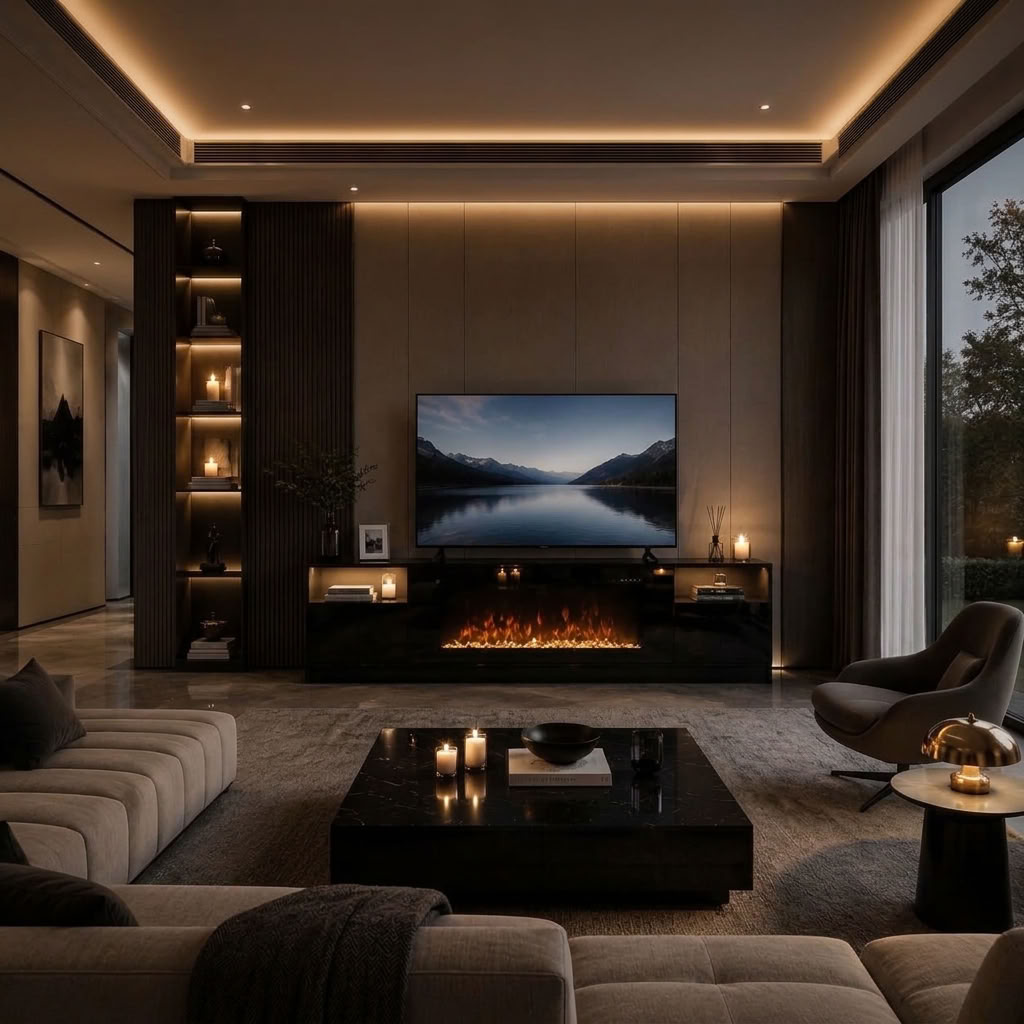
Farmhouse and rustic stands bring warmth and visible wood grain, and suit rooms that already lean cozy. Modern low consoles with clean lines suit larger TVs and calmer rooms, and they keep a big screen from overwhelming the space. A growing middle option is the fireplace stand: it adds real heat and a flame effect to the same footprint, which is worth weighing if the stand will anchor a living room you actually live in during winter. Whichever direction you lean, choose a tv stand you still want to look at with the TV off — it is furniture first and a screen perch second. And once the size is settled, our earlier guide on how to decorate a fireplace TV stand shows how to style the top so the stand looks finished, not just functional.
A Worked Example: Choosing a TV Stand for an 80 Inch TV
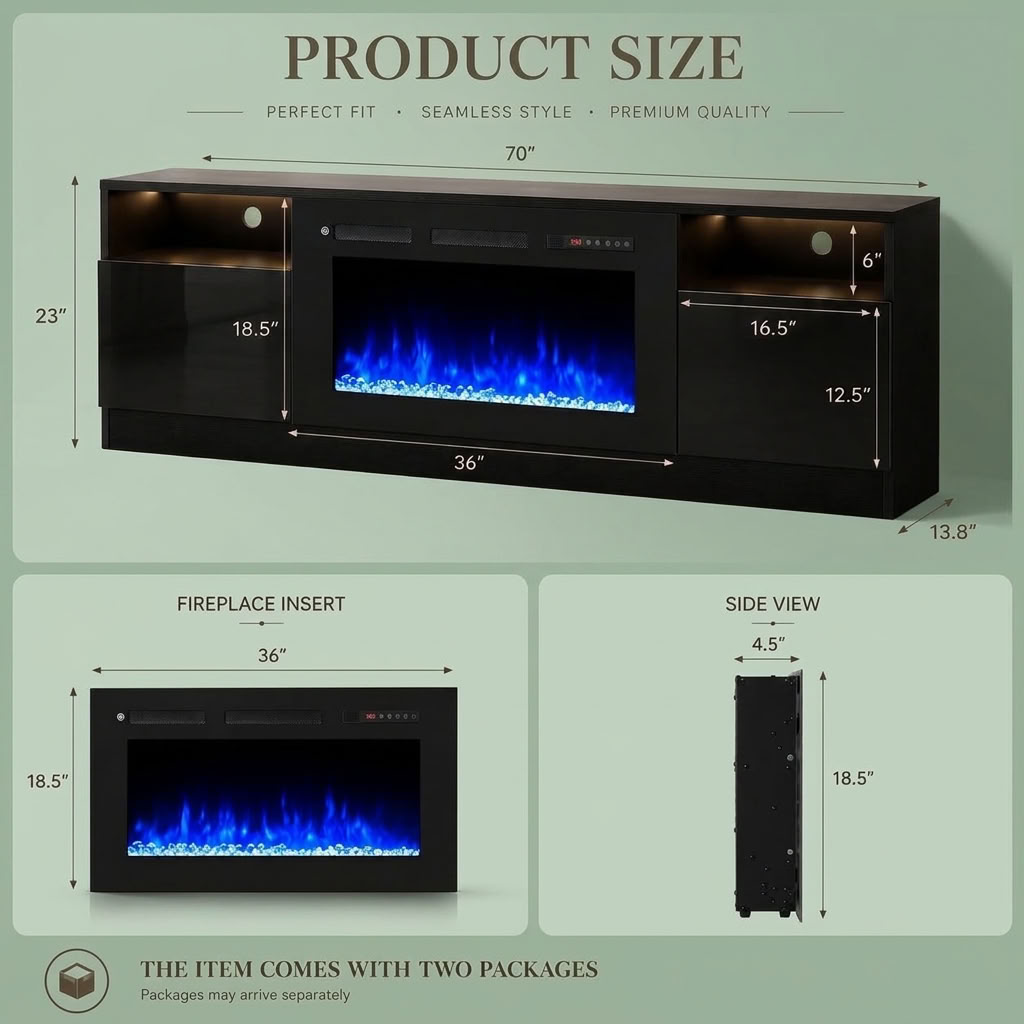
Put the five steps together on a real product. This fireplace TV stand with LED lights is a 70 inch wide, low modern console in black, rated by its maker for TVs up to 80 inches. Step one: a typical 80 inch TV is about 70 inches wide, so the fit is near the edge — exactly why you measure your own set first; for a 65 or 75 inch TV the same stand leaves comfortable margin on both sides.
Step two: at 23 inches tall, it keeps the center of a big screen close to seated eye level, which is the whole point of a low profile. Step three: the top panel is rated at 132 pounds, with 33 pounds per shelf. Step four: a storage cabinet, open shelves and cable management cover the standard gear list. Step five: the black modern finish, the 36 inch electric fireplace and the LED glow make it the room’s focal point rather than a table the TV happens to sit on.
That is what choosing the right tv stand looks like in practice — not the prettiest product photo, but the stand whose five numbers all come back yes.
Quick Checklist Before You Buy
Width: stand a few inches wider than the TV, and wider than the TV’s feet.
Height: screen center near 40 to 42 inches from the floor when seated.
Weight: TV plus gear comfortably under the top and shelf limits.
Storage: a planned home for every device, with airflow for consoles and receivers.
Cables: a back panel or cutouts that let cords disappear.
Extras that earn their footprint: if the stand includes a fireplace, check its heat output and flame-only mode — our guide on whether fireplace tv stands give off heat has the BTU numbers.
Conclusion
To choose a tv stand well, ignore the showroom order and use the buyer’s order: width, height, weight, storage, style. Measure your TV’s true width, set the screen at eye level, respect the weight limits, plan storage around the gear you actually own, and only then pick the look you love. Do those five things and the stand you choose will still feel right years after the TV on it has changed.
Recommended Fireplace TV Stand Categories
When you are ready to shop your shortlist, start with our fireplace TV stands for models that combine storage, heat and a focal point, or browse farmhouse TV stands for warmer finishes and traditional details. Use the same five checks as you compare — it is much easier to choose a tv stand when every product page is read in the same order.
Frequently Asked Questions
How much wider should a TV stand be than the TV?
Aim for a few inches of stand showing on each side of the TV — two to three inches per side is a good target. It looks balanced, protects the screen, and guarantees the TV’s feet land safely on the top panel.
What size TV stand do I need for a 65 inch TV?
A 65 inch TV is about 57 inches wide, so choose a tv stand around 60 to 70 inches wide. That range leaves the right margin on both sides and suits the most common living room layouts.
Can a TV be wider than its stand?
It should not be. A TV that overhangs its stand looks unstable because it is — the feet can sit too close to the edges, and a bump can matter. Always keep the stand at least as wide as the TV, and preferably a few inches wider.
Is a low or a tall TV stand better?
Neither is better in general — it depends on your TV size and your seating. Big TVs pair with low stands so the screen center stays at eye level; smaller TVs and higher seating, like a bed, suit taller stands. When choosing a tv stand for any room, measure your seated eye level in that seat and work back from there.
How much weight should a TV stand hold?
At minimum, the full weight of your TV plus everything you will put on the top, with room to spare. Check the maker’s stated top-panel limit — a stand rated around 130 pounds covers most large TVs and a soundbar comfortably, but always confirm against your own TV’s weight.